
How to invoice a website project with several deliverables
By Invoiceo · Published
Start with the website scope and fees you agreed with the client. Give each separately priced deliverable a clear invoice row: what you delivered, its quantity and the agreed fee. Use notes for the project reference and the limits of that work.
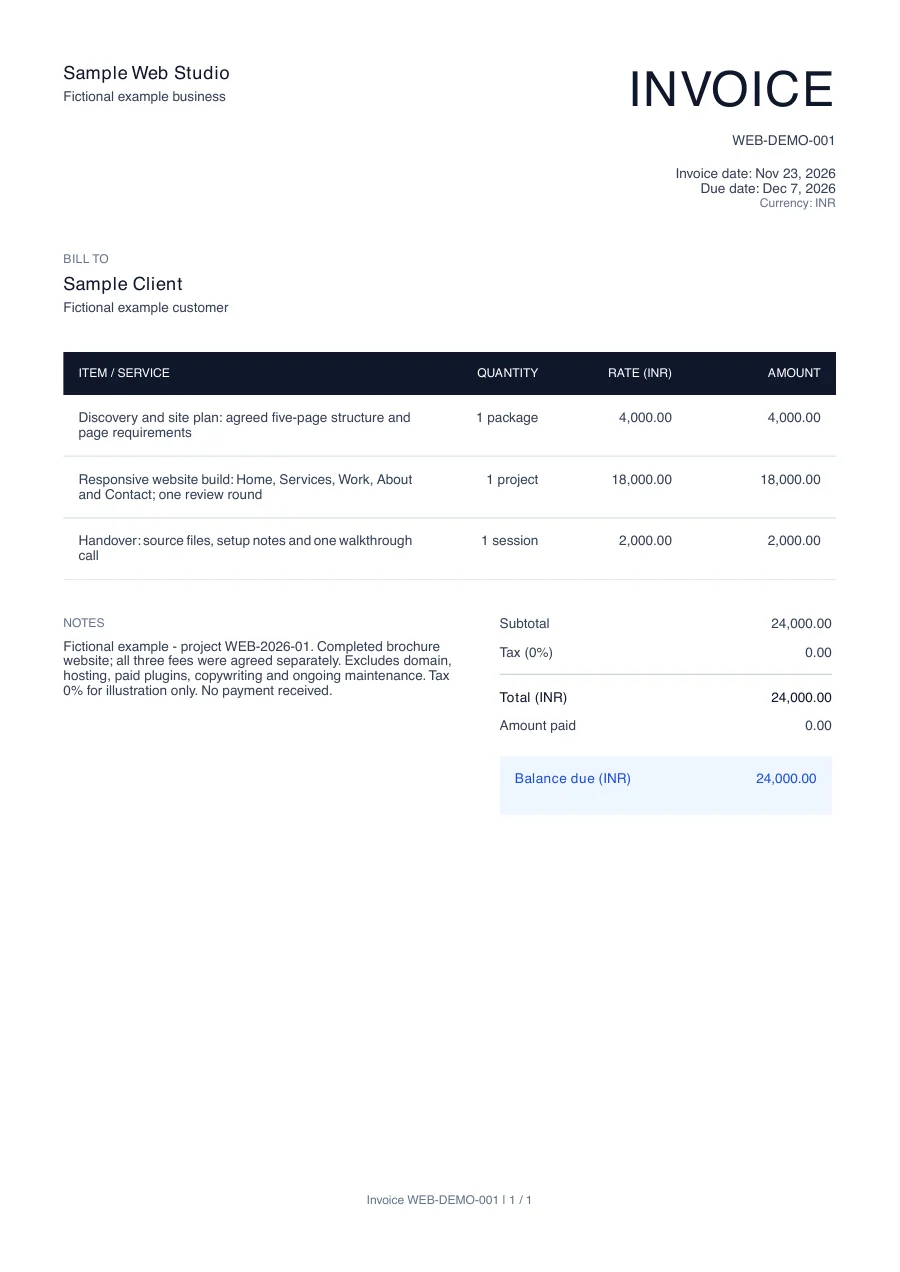
Below, a fictional completed brochure website has three agreed fees: ₹4,000 for discovery, ₹18,000 for the build and ₹2,000 for handover. The invoice totals ₹24,000. These are illustrative prices, not suggested market rates or a real customer project.
One completed website, three agreed deliverables
Sample Web Studio has completed project WEB-2026-01 for Sample Client. The fictional agreement prices discovery, the five-page website and handover separately, with the full amount billed once after completion. No deposit or earlier payment has been received.
Scroll across the table to see the amounts.
| Description | Quantity / unit | Rate | Amount |
|---|---|---|---|
| Discovery and site plan: agreed five-page structure and page requirements | 1 package | ₹4,000 | ₹4,000 |
| Responsive website build: Home, Services, Work, About and Contact; one review round | 1 project | ₹18,000 | ₹18,000 |
| Handover: source files, setup notes and one walkthrough call | 1 session | ₹2,000 | ₹2,000 |
| Total / balance due | ₹24,000 | ||
Each quantity is 1 because it represents one agreed package, project or handover session. The build covers five pages; its quantity is one project because this agreement prices the build as a whole. A per-page agreement would need its own quantity and rate.
This example has no discount, shipping or payment received. Tax is set to 0% solely to show the arithmetic. Use the tax treatment that applies to your actual work.
₹4,000 + ₹18,000 + ₹2,000 = ₹24,000
Invoice WEB-DEMO-001, dated 23 November 2026 and due 7 December 2026. The PDF uses fictional parties and the same descriptions, quantities and fees shown above.
Download the website invoice example PDFThe sample is a completed illustration. Enter your own details and agreed fees when creating an invoice.
Make each row match an agreed part of the work
“Website development” leaves the reader to find the scope elsewhere. “Responsive website build: Home, Services, Work, About and Contact; one review round” names the pages and the included review work. Use the wording your client can match to the agreed scope.
Keep the quantity and unit consistent with that wording. One handover session is different from one hour of support. If you agreed hourly work, use recorded hours and the agreed hourly rate; our hourly vs fixed-price examples show those field choices.
If your agreement has one price for the entire website, a single package row plus a scope note may describe it accurately. Do not invent separately agreed fees for discovery or handover to make the invoice look itemized. The three rows here reflect this example’s fictional pricing agreement.
Use notes to identify the project and exclusions. This sample excludes domain registration, hosting, paid plugins, copywriting and ongoing maintenance. Add an extra task only when its scope and charge have been agreed; review the total against that agreement.
Enter the deliverables in Invoiceo
- Enter the parties and dates. Add your business and customer details, invoice number, invoice date and due date. Select INR for this example; use your own agreed currency and dates.
- Add each service row. Select Service under Item type, enter the description, quantity, unit and rate, then add the row. Repeat for each separately priced deliverable.
- Add a scope note. Include the project reference and relevant limits under Notes. Keep the detailed scope and any approved changes with your project records.
- Check totals and download. Confirm each quantity × rate and the final balance, including any actual adjustments. Review the PDF before sending it through your chosen channel.
The guest editor creates a downloadable PDF without signup. Downloading does not send the document or record a payment. For the full field-by-field introduction, read how to create a freelance invoice.
Check the finished document against the scope
- Confirm the customer, project reference, invoice number and dates.
- Read every description in the PDF. Check page names, included review work and handover details for wrapping or missing text.
- Compare the billed fees with the agreement and any previous invoices or payments, so the same work is not billed twice.
- Review payment instructions and the balance due, then keep a copy of the PDF and the record of how you sent it.
This example bills the full completed project once. If you bill deposits or separate stages, agree what each document covers and check earlier amounts before preparing the next invoice. Invoiceo does not turn these three rows into an automated milestone schedule.
If the work is still being proposed, start with the agreed scope and a quotation. The quotation-to-draft-invoice workflow explains the saved account steps after owner-recorded acceptance.
Create your website project invoice
Use your agreed deliverables and fees, review the totals and download a PDF from Invoiceo’s guest editor.
Create your website invoice